
Websites and SEO
The SEO Basics Every New Business Owner Should Understand
What SEO Actually Does, What Matters First, and What You Can Ignore for Now
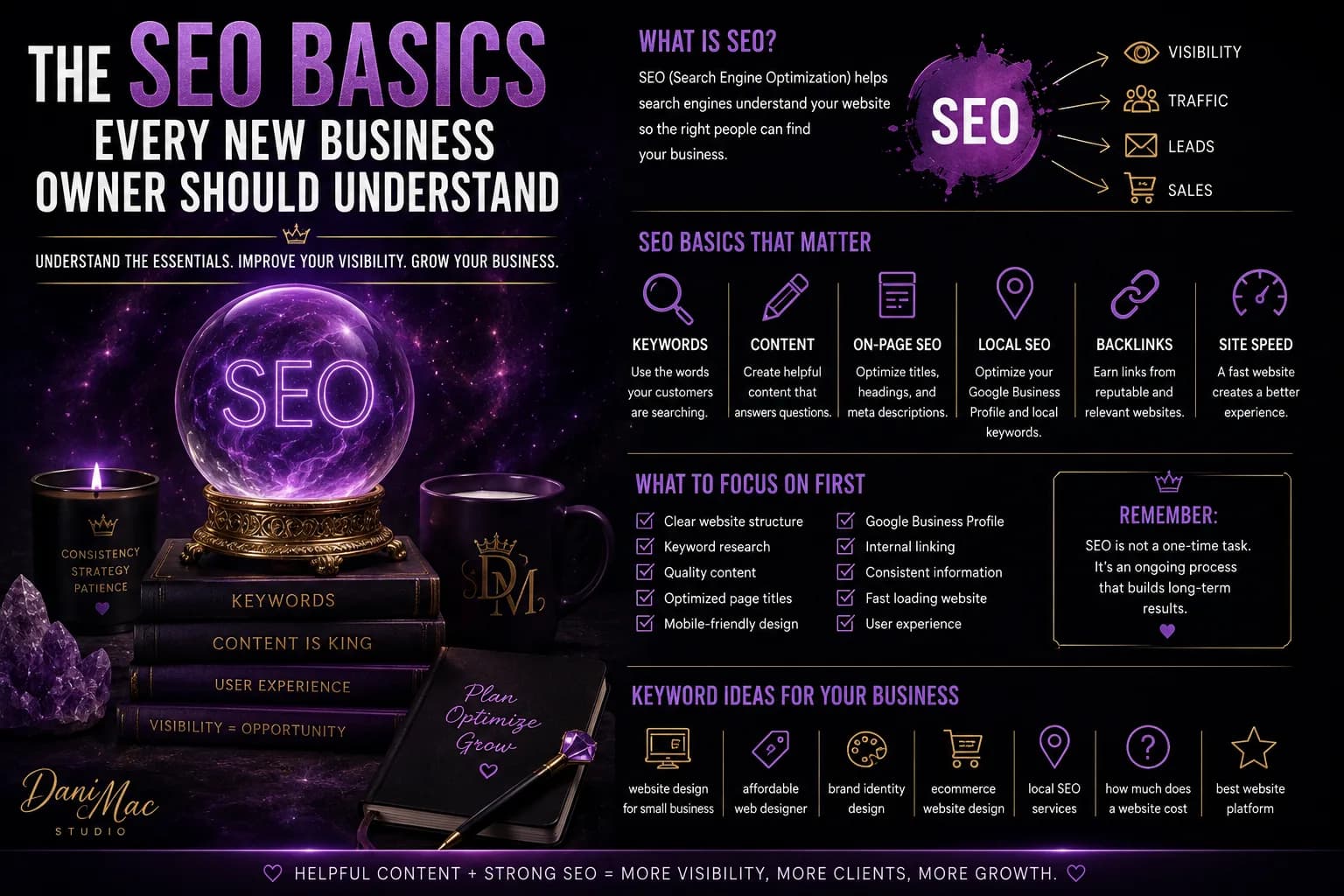
SEO is one of those business topics that sounds way more intimidating than it actually needs to be.
You hear people talking about algorithms, backlinks, domain authority, keywords, metadata, technical SEO, search intent, schema, Core Web Vitals, and 900 other terms that make it sound like you need a computer science degree just to get your website found.
You do not.
At least not to get started.
If you are a new business owner, you do not need to become an SEO expert.
You need to understand the basics well enough to make good decisions.
That is it.
SEO is simply the process of making it easier for search engines to understand your website and easier for the right people to find it.
Everything else is a layer on top of that.
First: SEO is not magic
SEO is not:
- adding the same keyword 47 times to one page
- stuffing your city name into every paragraph
- installing a plugin and hoping for the best
- publishing five AI articles a day
- buying 10,000 backlinks from somebody named “SEO King 999”
Good SEO is mostly about helping search engines understand:
- what your business does
- who your website is for
- what each page is about
- where your business operates
- whether your website is useful and trustworthy
If your website is confusing to humans, it is usually not going to be magically clear to Google either.
Start with search intent, not keywords
A lot of beginners start SEO by trying to find keywords.
That is not wrong.
But there is something more important first:
What is the person actually trying to do?
That is search intent.
Someone searching:
“how much does a website cost”
has a different goal from someone searching:
“web designer Tucson”
And both are different from:
“best website platform for small business”
One person is researching price.
One is looking for a provider.
One is comparing options.
Your content should match the reason behind the search.
Dani’s practical check: Before optimizing a page, ask yourself: what would someone typing this search actually want to see when they land here?
Keywords still matter — just not the way people think
A keyword is simply a word or phrase someone types into a search engine.
Examples:
- affordable web designer
- small business website design
- bookkeeper for freelancers
- mobile dog groomer Phoenix
- how to build business credit
Your job is not to cram these phrases into the page until the copy sounds ridiculous.
Your job is to naturally make it clear what the page is about.
If you offer website design in Tucson, your site should probably actually say:
website design
and:
Tucson
somewhere meaningful.
Revolutionary, I know.
Every important page needs one clear topic
This is where a lot of small-business websites get messy.
They try to make one page rank for:
- website design
- branding
- SEO
- social media
- logos
- e-commerce
- consulting
- and approximately six other things
Search engines prefer clarity.
So do customers.
Instead of making one giant services page carry your entire business, create dedicated pages for important offers when it makes sense.
For example:
- Website Design
- Website Redesign
- Brand Identity
- E-Commerce Websites
- SEO Setup
Each page can explain that specific service in more depth.
Now the search engine has a clearer idea of what each page is about.
Your page title matters
Your SEO title is one of the strongest signals telling search engines what a page is about.
It is also often what people see in search results.
A weak title might be:
Services | Dani Mac
A stronger title might be:
Custom Website Design for Small Businesses | Dani Mac Studio
The second one actually explains what the page offers.
Do not turn titles into keyword soup.
Just make them clear.
Your meta description helps people decide whether to click
A meta description is the short summary that can appear under your page title in search results.
It is not the most powerful ranking factor, but it matters because it can influence whether someone clicks your result.
A useful meta description answers:
- what is on the page
- who it is for
- why someone should care
For example:
Custom website design for small businesses that want a more professional online presence. Explore website builds, redesigns, and e-commerce options.
Simple.
Clear.
No keyword gymnastics required.
Your headings should actually explain the page
Headings are not just for making text bigger.
They organize the page.
Your main page heading should clearly describe what the page is about.
Then your H2s and H3s should break the content into useful sections.
For example:
Bad structure
- Welcome
- Learn More
- Why Us
- More Info
Better structure
- Custom Website Design for Small Businesses
- What Is Included in a Website Build
- How the Website Design Process Works
- Website Design Pricing
- Frequently Asked Questions
The second version tells both people and search engines what the page contains.
Your website copy should sound human
You do not need to write like this:
“Looking for the best affordable website designer in Tucson Arizona for affordable website design Tucson services?”
Please do not.
That is not SEO.
That is a cry for help.
Write for real people first.
Use the words your customers are actually searching for naturally inside useful copy.
Search engines have gotten much better at understanding context.
You do not need to repeat the exact phrase every four sentences.
Local businesses need local SEO
If you serve customers in a specific location, local SEO matters a lot.
Think:
- contractors
- salons
- restaurants
- photographers
- cleaners
- real estate agents
- local consultants
- home-service businesses
Your website should make your service area clear.
You may want to naturally include your:
- city
- region
- service area
- nearby areas you genuinely serve
Do not create 500 nearly identical pages for every ZIP code just because somebody told you it was an SEO hack.
If the page is not genuinely useful, it probably does not belong there.
Your Google Business Profile matters
For local businesses, your Google Business Profile can be one of your most important online assets.
It helps your business appear in local search results and map-based searches.
Keep it accurate.
Pay attention to:
- business name
- category
- address or service area
- phone number
- website
- business hours
- photos
- services
- reviews
And please do not stuff keywords into your business name if they are not actually part of your business name.
“Dani Mac Studio Best Affordable Web Designer Tucson Arizona SEO Website Queen” is not subtle.
Your website needs to work on mobile
Mobile usability is an SEO issue and a customer-experience issue.
If your site:
- loads badly on phones
- has tiny text
- requires zooming
- has buttons too small to tap
- cuts off important content
- has a broken mobile menu
you are making life harder for both visitors and search engines.
Responsive design is not a bonus feature anymore.
It is basic website maintenance.
Page speed matters, but do not become obsessed with a perfect score
Your website should load reasonably quickly.
People are impatient.
Search engines care about user experience.
But new business owners sometimes go completely insane trying to move a performance score from 94 to 100 while the homepage still does not clearly explain what the business sells.
Priorities.
Common speed problems include:
- massive image files
- too many scripts
- bad hosting
- unnecessary animations
- too many plugins
- auto-playing videos
- poorly optimized code
Fix obvious problems first.
Then move on with your life.
Your images need SEO too
Images can affect accessibility, speed, and search visibility.
Use:
- descriptive file names
- appropriate image sizes
- compressed files
- useful alt text
Alt text should describe what the image communicates.
For example:
Bad:
IMG_83746.jpg
Better:
custom-small-business-website-design.jpg
And your alt text might be:
Desktop and mobile mockup of a custom small-business website design.
Do not stuff keywords into alt text either.
Accessibility comes first.
Internal links help people and search engines navigate your site
Internal links connect one page of your website to another.
For example, in a blog post about website mistakes, you might link to your:
- website design service
- website redesign page
- SEO guide
- related blog article
This helps visitors discover useful information.
It also helps search engines understand how pages relate to each other.
Do not leave every page sitting alone like it has been grounded.
Blogging can help SEO — if the content is actually useful
You do not need a blog just because somebody told you businesses are supposed to have one.
But useful articles can help you rank for questions and searches that your main service pages may not cover.
For example, a web designer might write:
- How Much Does a Small Business Website Cost?
- What Makes a Website Look Cheap?
- Do I Need a Website If I Have Instagram?
- DIY Website vs. Professional Website Design
- What Pages Does a Small Business Website Need?
Those are questions potential customers may actually search.
That is useful content.
Publishing 100 articles titled things like:
“Top 10 Amazing Business Tips You Need to Know Today”
probably is not doing anybody a favor.
Backlinks matter, but you do not need to obsess over them immediately
A backlink is a link from another website to yours.
Search engines can view quality backlinks as signals of credibility.
But this is another area where beginners get sold ridiculous nonsense.
Do not buy hundreds of random links.
Do not spam blog comments.
Do not let somebody create 7,000 links from websites that look like they were built inside a basement in 2004.
Good backlinks often come naturally from:
- local directories
- industry organizations
- business partnerships
- press coverage
- guest contributions
- useful resources people genuinely want to reference
Quality matters more than quantity.
Reviews can support local visibility and trust
Reviews are useful for more than making you feel good when somebody says something nice about your business.
They can help potential customers decide whether they trust you.
For local businesses, they can also support your overall local search presence.
Ask real customers for honest reviews.
Do not buy them.
Do not write 42 reviews yourself from suspicious Gmail accounts.
We are trying to build a business, not a tiny criminal enterprise.
Technical SEO exists — but you do not need to learn all of it today
Technical SEO covers things happening behind the scenes.
That can include:
- site structure
- crawlability
- indexing
- sitemaps
- redirects
- canonical tags
- structured data
- site performance
- broken links
These things absolutely matter.
But if you are brand new, you do not need to spend your first week learning what a canonical URL is.
Start with:
- a working website
- clear pages
- good titles
- useful copy
- mobile usability
- basic local information
- helpful content
Then improve the technical layers as the site grows.
SEO takes time
This part irritates people because everybody wants the answer to be:
“Do these four things tonight and wake up number one on Google tomorrow.”
That is not how it works.
Search visibility usually grows over time.
Search engines need to:
- discover your pages
- understand them
- compare them with alternatives
- see how useful and trustworthy your site appears
Competitive searches can take longer.
Niche or local searches may be easier.
There is no universal timeline.
Anybody guaranteeing you a specific number-one ranking should make you suspicious.
Do not chase every algorithm update
If you spend enough time in SEO communities, every Google update sounds like the apocalypse.
Sometimes updates do matter.
But most small-business owners will get farther by consistently doing boring useful things:
- make your website clear
- keep information accurate
- publish genuinely useful content
- improve weak pages
- fix technical problems
- earn trust
- understand what customers are searching for
Build for customers first.
Then make it easy for search engines to understand what you built.
A simple beginner SEO checklist
If you are starting from zero, focus on this first:
- Make sure your website clearly explains what you do.
- Choose one main topic for each important page.
- Write clear SEO titles and meta descriptions.
- Use descriptive headings.
- Include relevant keywords naturally.
- Make your location clear if you serve a local market.
- Set up and complete your Google Business Profile if applicable.
- Make sure the website works well on mobile.
- Compress large images and write useful alt text.
- Link related pages together.
- Publish useful content based on real customer questions.
- Fix broken links, pages, and obvious technical issues.
That foundation will get most new businesses much farther than obsessing over advanced SEO tricks.
Frequently asked questions
Can I do SEO myself?
Yes.
A new business owner can absolutely handle basic SEO.
You may eventually need professional help for technical issues, competitive markets, large websites, or a more advanced strategy, but understanding the basics will help you make better decisions even if you hire someone later.
How much does SEO cost?
It depends on what you need.
Basic on-page improvements are very different from an ongoing SEO campaign involving content, technical work, local SEO, competitor analysis, and link building.
Do not buy SEO based only on the cheapest monthly package you can find.
Know what work is actually being done.
How long does SEO take?
There is no guaranteed timeline.
Results depend on your market, competition, website, search terms, location, existing authority, and the quality of the work.
Some improvements can affect visibility fairly quickly.
Other rankings may take months or longer.
Do I need to blog every week?
No.
A smaller number of useful articles is better than publishing constantly just to say you did.
Focus on questions, problems, and topics your customers actually care about.
Is SEO better than social media?
They do different jobs.
Social media is useful for attention, relationships, and discovery.
SEO can help capture people who are actively searching for information, products, or services.
A strong business can use both instead of making them fight in an imaginary marketing cage match.
The bottom line
You do not need to understand every part of SEO before you can benefit from it.
Start with clarity.
Make sure people and search engines can understand:
- what your business does
- what each page is about
- where you operate
- what problems you solve
- why someone should trust you
Then build from there.
SEO is not about tricking Google.
It is about making your business easier to find when someone is already looking for what you offer.
That is the part worth paying attention to.
Want your website to actually get found?
If you already have a website but SEO feels like a language nobody bothered to teach you, Dani Mac Studio offers website and SEO services designed to make your online presence clearer, stronger, and easier for the right customers to find.
Keep building with intention.
Explore the practical tools, services, and systems across the Dani Mac ecosystem when you need the next layer of support.
Explore resources →Related reading
What Your Business Actually Needs Before You Build a Website
Clarify your offer, audience, goals, content, domain, and calls to action before investing in a business website.
Read article →Domain, Hosting, and Professional Email Explained Without the Tech Jargon
Understand domains, web hosting, DNS, and professional email with a plain-language guide for new business owners.
Read article →
What Makes a Website Look Cheap—and How to Fix It
A website does not have to cost thousands to look professional—but a few bad design choices can make even a good business look sketchy, outdated, or thrown together. Here are the biggest things making websites look cheap and the fixes that actually make a difference.
Read article →About Dani Mac
I’m an entrepreneur, designer, digital-product creator, author, and builder of several connected brands. I share what works, what needs testing, and what I would do differently.
Explore my work →